
Here are our recommended best practices to help increase patient engagement, make reordering more convenient, and get more value from Otto.
1. Use Otto for Every Contact Lens Order
Use Otto to process both in-office and online contact lens orders through Otto.
Keeping orders in Otto helps centralize your order history while ensuring ALL patients benefit from:
- Digital rebates
- Automated refill reminders
- 2-click easy patient reordering
- Patient tracking
- Automatic processing of eligible reorders while the prescription remains valid
The more consistently your team uses Otto, the more complete and effective these workflows become.
2. Show Every Contact Lens Patient a Lens Quote
Every contact lens patient should see a Lens Quote before leaving your office, whether or not they're ready to purchase.
Patients who typically buy contacts online will assume the online competitor is the better option. A Lens Quote makes it easy to show your clinic's actual pricing, including:
- Supply-level savings
- Eligible rebates
- Insurance
- Promotional discounts
- Competitor pricing for Premium clinics
It gives your team an easy way to have the pricing conversation without manually calculating everything.
Premium Users: Include competitor pricing on Lens Quotes when appropriate. Prices pull from Clearly in Canada or 1-800 Contacts in the US and are updated regularly.
3. Pair Every Lens Quote with an Order Link
If the patient doesn't purchase before leaving, send them an Order Link.
This is especially important for:
- Trial lens patients
- Patients who want to think about their purchase
- Patients who normally purchase online
- Patients who aren't ready to order a full supply
An Order Link gives the patient a convenient way to purchase the products you've already recommended without having to call your office or search for the product themselves.
Never simply direct the patient to browse your Webstore. Always send a personalized Order Link with their recommended products assigned.
4. Tell Patients to Expect the Order Link
Don't let the Order Link arrive unexpectedly.
Before the patient leaves, tell them that you'll be sending a link that makes it easy to order directly from your clinic so they have what they need if they are interested.
Setting this expectation helps the patient recognize what the message is and why they're receiving it.
Walk Out Tip: Frame sending an order link as a convenience for patient instead of asking permission. Try saying: "I'm going to send you a link for the products the Doctor recommended today so you can easily pull that up if you are interested. "
5. Set the Patient's Preferred Communication Method
Otto can communicate with patients by text or email—but it's worth asking which they prefer.
Set the patient's preferred communication method so important messages, Order Links, and reminders are delivered through the channel they're most likely to see and interact with.
You can also encourage patients to save +1 (844) 499-0194 under your clinic's name in their phone so they recognize future Otto text messages as communications from your clinic.
6. Set Accurate Refill Reminders
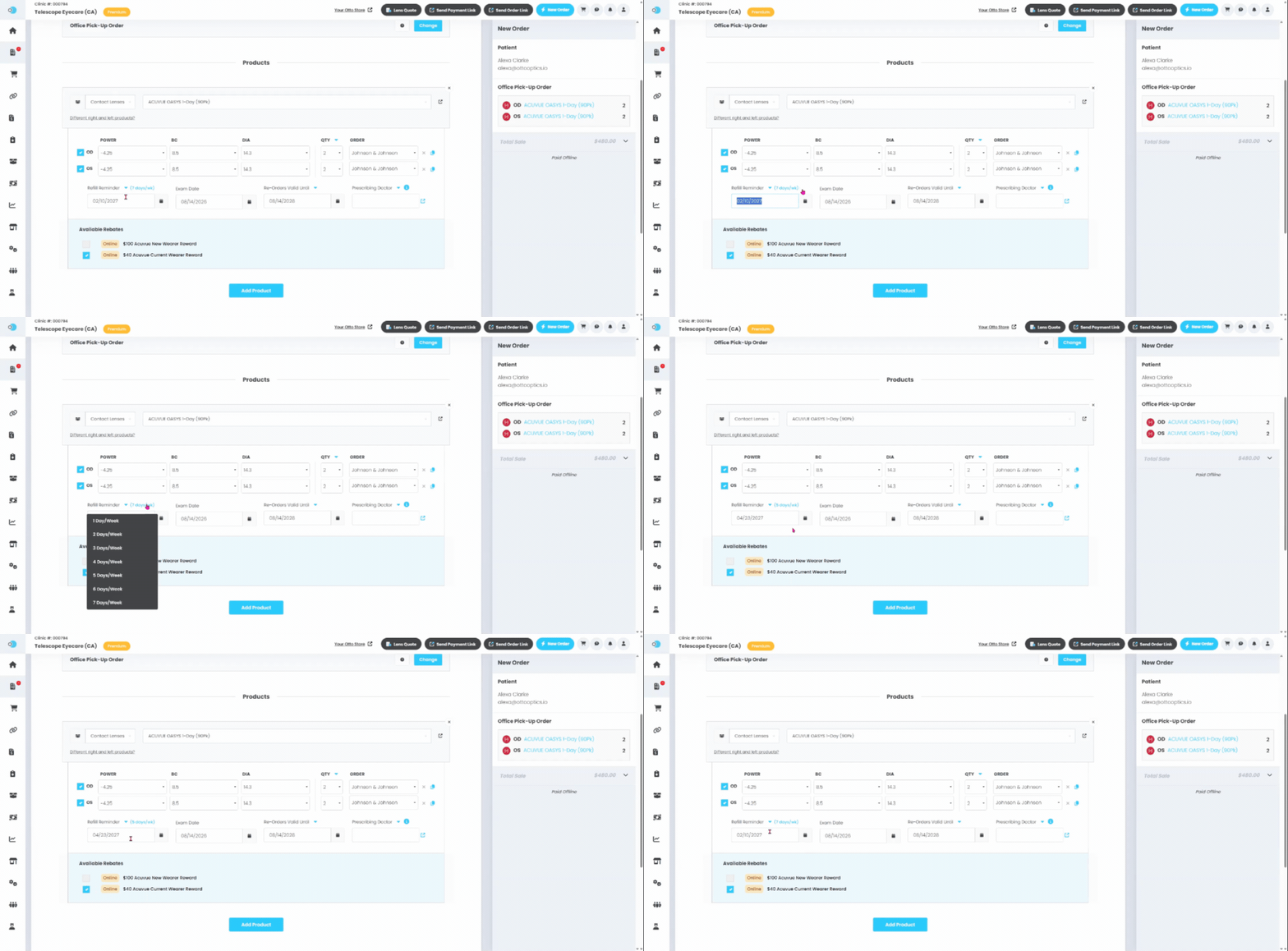
Otto automatically calculates refill timing based on the quantity purchased and the patient's expected lens usage.
For patients who wear every single day, no adjustment is necessary.
However, if a patient wears daily disposable lenses part-time, use the shortcut beside the Refill Reminder to indicate approximately how many days per week they wear their contacts.
For example, someone wearing daily lenses Monday-Friday, set their usage to 5 days/week. Otto will then recalculate the refill reminder so it is sent to the patient based on their wearing frequency.
Setting accurate usage helps Otto reach out when the patient is actually approaching the end of their supply.
7. Always Enter the Prescription Expiration Date
Always enter the patient's prescription expiration date in Re-Orders Valid Until.
This allows Otto to determine how long the saved prescription is valid for automatic processing and helps prevent an expired prescription from being processed.
It also supports Otto's prescription expiration workflow. One month before expiration, Otto will notify the patient that their prescription is approaching its expiration date.
This setting can be viewed under Settings> Preferences
If your clinic typically uses a consistent prescription duration, configure your default expiration period to reduce the amount of manual entry required by your team.
Premium Tip: Add your online appointment booking link under Settings > Preferences > Appointment Booking Link to make it easier for patients approaching expiration to schedule their next exam.
8. Let Patients Know About Future Reminders
When a patient purchases from your clinic, explain what happens next.
Let them know that:
- Applicable rebate information will be sent digitally.
- They'll receive a reminder when they're approaching the time to reorder.
- Their reorder link will make it easy to purchase from your clinic again.
- They won't need to create an account or remember a password to use their personalized link.
This helps patients understand that your clinic offers the same convenience they may associate with online retailers.
9. Follow Up with Patients Who Don't Complete Their Purchase
Don't assume a patient isn't interested just because they didn't purchase immediately.
For Premium clinics, monitor Abandoned Carts from your Otto Dashboard and follow up with patients who started but didn't complete an order.
You can send another personalized Order Link to make it easy for them to return to their purchase.
For patients who haven't ordered in a longer period of time, consider a more personal reactivation strategy. A phone call to patients who haven't ordered in six months or more can help your team understand whether they need contacts, have switched products, or are due for another exam.
10. Use Otto to Expand Your OTC Offering
EyeDropShip allows your clinic to offer hundreds of eligible OTC products without having to carry all of them in inventory.
Use it to complement—not replace—your existing in-office OTC sales.
Consider:
- Offering a broader range of dry eye and OTC products
- Sending Order Links for products recommended during appointments
- Using EDS when you don't carry a recommended product
- Using Manual Fulfillment when you already have the product in-office
- Encouraging eligible patients to use Auto-Reorder for products they purchase regularly
This gives patients a convenient way to continue purchasing recommended products directly from your clinic.
11. Make Your Webstore Easy to Find
Your Webstore can reinforce that your clinic offers convenient online ordering.
Consider:
- Embedding your Otto Store on your website
- Creating an easy-to-remember branded URL
- Adding your store link to email signatures and newsletters
- Adding it to your social profiles
- Creating QR codes for business cards, contact lens materials, or in-office signage
- Using Otto's marketing materials to promote online ordering
However, when you're recommending a specific product to an existing patient, a personalized Order Link should generally be your first choice because the appropriate products are already preloaded for them.
12. Add a Sales Message to Your Lens Quotes
Customize the message patients see on their Lens Quotes under:
Settings > Business Information > Sales Message
Use this space to reinforce why patients should purchase from your clinic.
For example:
- Thank patients for supporting a local business.
- Highlight a current promotion.
- Mention free shipping or another clinic-specific benefit.
Keep the message short and relevant to the purchasing decision.
13. Review Your Performance
Regularly review Otto's reporting to understand how patients are purchasing and where opportunities may exist.
Look at:
- Sales and order trends
- Top-selling products
- Order Link activity
- Refill activity
- Patient purchasing patterns
- Online vs. in-office sales
Premium clinics can use Advanced Analytics for additional insight into Order Links, Lens Quotes, refill performance, purchasing behavior, and other trends.
Use this information to identify opportunities—not just to report on what already happened.
14. Look for Opportunities at the Next Exam
Otto can also help support conversations beyond the patient's current purchase.
For example, clinics may want to identify monthly or bi-weekly contact lens wearers approaching prescription expiration and discuss whether daily disposables would be appropriate at their next exam.
This creates an opportunity to revisit the patient's needs rather than automatically repeating their previous purchasing pattern.
15. Keep Your Team Trained and Consistent
The best workflows work when the entire team uses them consistently.
A simple clinic-wide standard—such as “Every contact lens patient gets a Lens Quote, an invoice, or an Order Link before they leave”—can help make Otto part of the normal patient experience.
Lean on our Success team for support! Anytime you are unsure about anything Otto related, go to the Support tab (beside the blue "New Order" button). There you will find:
- Tutorial Videos - Pre-recorded walkthroughs of the Otto platform and it's main features.
- Book Support Call - Connect with our Success Team for personalized help and guidance.
- Ask Us - Have a question?
- Start with the chatbot for 24/7 help with procedural and how-to questions.
- Submit a Support Ticket for order-specific questions or issues that require our team's assistance.
- Knowledge Base - Step-by-step guides and visuals for Otto features and workflows.
- Report a bug - Let us know ASAP if something isn’t working as expected.
- Implementation Guide - Setup resources and best practices for getting started with Otto.
Quick Summary: The Otto Best-Practice Checklist
For the biggest impact, build these habits into your everyday workflow:
- Process contact lens orders through Otto
- Show every contact lens patient a Lens Quote
- Send an Order Link when the patient doesn't purchase
- Tell patients to expect their Order Links and refill reminders
- Set each patient's preferred communication method
- Adjust refill timing for part-time daily disposable wearers
- Always enter Re-Orders Valid Until / prescription expiration dates
- Use Abandoned Carts and follow-up workflows to recover opportunities
- Send Order Links for recommended OTC products
- Use EDS to expand your OTC selection without carrying unnecessary inventory
- Review your sales and engagement data regularly
- Train your entire team on a consistent Otto workflow
The goal is simple: make purchasing from your clinic as easy and convenient as possible while keeping your team connected to the patient throughout their purchasing and refill journey.